French English Italian
km   mi
Sign Up Log-In Log out
logo openrunner
Print
Cancel

logo openrunner
 
Print
Cancel

logo openrunner

 
Print
Cancel
Reproduction rights are restricted to personal and private use only. Route ID:
  • HOME
  • PLAN A ROUTE
  • FIND A ROUTE
  • HELP & NEWS
  • MY SPACE
Go
Enlarge to full screen  Show passes Show Panoramio pictures Display 'Logis' accommodation

Print preview all displayed routes Help
Save the route Save the modifications made to the route or modify an element of the description of the route Delete the route

Open and close the POI editor Save the modifications made to the POI
Show/hide Openrunner tools for creating and saving routes
Import GPS Tracks from file or directly from GARMIN devices. Show/Hide route points title= Insert points between two existing points. title= Delete the last point of the route Delete all points on the route Reverse the direction of the route Back to start Back direct to start Automatically follow the road using a routing calculator Modify the routing calculator or the chosen mode (Pedestrian, Car, Cycle)
x
x

Getting started with Openrunner

Create a new route from a GPS track

Use the import from GPS function  Import GPS Tracks from file or directly from GARMIN devices.


Create a route from scratch? Proceed as follows:


To begin, center the map on the location of your choice.
Then add points by clicking on the base map.
Simplify your task by using the route calculators Automatically follow the road using a routing calculator, the route follow the road automatically if the chosen calculator knows about it. More information here.

You can save your route at any time Save the route and resume the route later.
Once your route is saved you have access to a multitude of features: elevation profile, GPS export, printing, sharing, etc..

You want to change information entered or make modifications to the route after saving, use Save the modifications made to the route or modify an element of the description of the route


Need to learn more before starting?

Read the Quick Start Guide.

Close
Center on

Enlarge to full screen  Show passes Display 'Logis' accommodation

Print preview all displayed routes Help
Save the route Save the modifications made to the route or modify an element of the description of the route Delete the route

Open and close the POI editor Save the modifications made to the POI
Show/hide Openrunner tools for creating and saving routes
Import GPS Tracks from file or directly from GARMIN devices. Show/Hide route points Move the map Draw a route Insert points between two existing points. Delete points on the route Delete the last point of the route Delete all points on the route Reverse the direction of the route Back to start Back direct to start Automatically follow the road using a routing calculator Modify the routing calculator or the chosen mode (Pedestrian, Car, Cycle)
x
x

Getting started with Openrunner


Create a new route from a GPS track

Create a new route from a GPS track  Import GPS Tracks from file or directly from GARMIN devices.


Create a route from scratch? Proceed as follows:

To begin, center the map on the location of your choice, changing the zoom level and moving the map.
Select the Draw a route tool Draw a route
Then add points by clicking on the base map.
Simplify your task by using the route calculators Automatically follow the road using a routing calculator, the route follow the road automatically if the chosen calculator knows about it. More information here.

You can save your route at any time Save the route and resume the route later.
Once your route is saved you have access to a multitude of features: elevation profile, GPS export, printing, sharing, etc..

You want to change information entered or make modifications to the route after saving, use Save the modifications made to the route or modify an element of the description of the route


Need to learn more before starting?

Read the Quick Start Guide.

Close
x
x
x
1 of 4
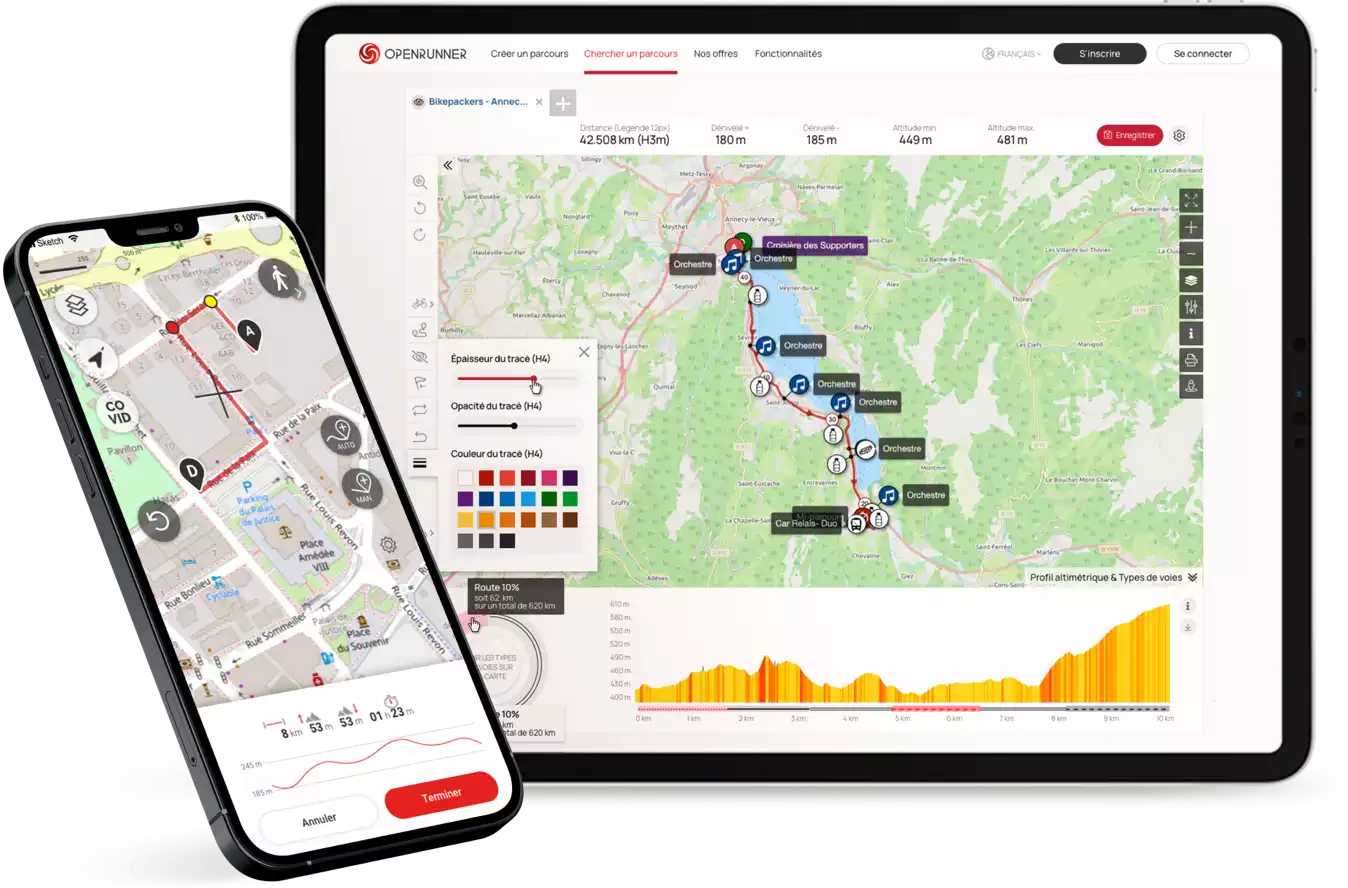
  • Plan, create, find routes for outdoor activites…
  • ... print, share, transfer to GPS, embed in websites ...
  • ... mark routes with colors...
  • ... and do much more.
Previous
Next
Create Routes
Search for routes
Calculate the Elevation
Import from GPS
Print Route
Share Routes
Embed in websites
Transfer to GPS
Add Logos
Add Colors
Add Descriptions
Communicate with others
View road passes
OSM-OCM base map
Find accommodation
See all the features


To use all the features of Openrunner you need to create a user account. It's personal, confidential and FREE, and only takes a few seconds.


Sign Up


Openrunner News

21 mai

Résultats du jeu-concours Trail de la Biroussanne 2012


Les gagnants de ce jeu-concours sont:

  • Philippe CHARPIN
  • Pascal COMMES
  • Mickaël DIANCOURT
  • Louis GIAVARINI
  • François LANNES
  • Marc LEROYER
  • Cyril LIN WEE KUAN
  • Valérie MARTIN
  • Jean-Luc MARTY
  • Patrick VERHAEGHE
Chacun reçoit une inscription pour le Trail et une invitation pour le repas d’après course.
Bravo à eux et merci à tous les participants.
Advertiser

06 mai

Gagnez des inscriptions pour le Trail de la Biroussanne 2012 (Ariège)


Trail Ariège

Le Trail de la Biroussanne (20km/1000m D+) se déroulera le 30 Juin 2012 au coeur du Parc Naturel des Pyrénées Ariégeoises et à quelques foulées du Val d’Aran Espagnol.

Nouveauté cette année, le Trail de la Biroussanne est inscrit au Challenge National « TOUTRAIL CHALLENGE 2012″. Ce challenge comptera 10 épreuves en France et en Belgique.


Openrunner et l’équipe organisatrice du Trail de la Biroussanne vous offrent des inscriptions pour l’édition 2012.


Inscrivez-vous au jeu-concours entre le 06 et le 16 Mai 2012 pour pouvoir participer au tirage au sort qui aura lieu le 17 Mai 2012.

01 mar

De nouvelles fonctionnalités


Elles étaient attendues, les voici enfin:

  • Des formats d’impression supplémentaires qui privilégient la taille du fond de carte.  
  • La présence des couches Natura 2000 sur le fond de carte IGN-France
06 jan

Bonne Année 2012 – Nouveau Jeu-Concours


L’équipe Openrunner vous souhaite une excellente année 2012, pleine de santé et de succès.


Pour bien démarrer l’année, un nouveau jeu-concours est lancé en partenariat avec Maxi-Race du lac d’Annecy.


Tentez de gagner des inscriptions aux différentes épreuves.


Inscrivez-vous entre le 07 janvier et le 20 janvier 2012 pour pouvoir participer au tirage au sort qui aura lieu le 21 janvier 2012.

Race and Event Area


Race organizers, announce your event on this page. Include a link to your website, more info on the services page.


Most viewed routes

Advertiser


Global statistics

Advertiser


Facebook


New to Openrunner? Read this.
Need help with the tool bar? Click this button Help
Questions about the functioning of Openrunner? See the documentation and the FAQ.


New to Openrunner? Read this.
Need help with the tool bar? Click this button Help
Questions about the functioning of Openrunner? See the documentation and the FAQ.

With GOOGLE MAPS
With IGN-France map
logo or
logo or
Latest News
Features
FAQ
Doc
SERVICES
x
The maximum number of routes that can be viewed simultaneously has been reached. You must delete one of the routes listed in order to view a new route. To delete a route, refer to thedocumentation.

Choose the print preview format

  NB: A4-Landscape format is available only with IGN-France Base Map.
Support Openrunner Terms of use The team Contact Partners - www.openrunner.com - CNIL N°1469279 - ©2006-2012 N°00040488